
Tap to reload
QR code
Network error, please check it.
Refresh
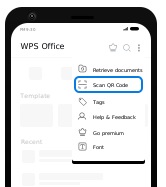
Scan QR Code viaWPS for Android
If you can't log in, please update WPS for Android to the latest versionSteps
1. Open WPS with your Android phone
2. Tap menu  and select [Scan QR code]
and select [Scan QR code] 3. Point your phone to this screen to capture the QR code

 QR code scanned
Scanned. Waiting for Android phone to confirm sign-in
Sign-in information has expired. Please sign in again.
Cancel sign-in
Sign in again